git代理配置原因
就算代理设置了全局代理,git上传时走的也是hosts文件配置。因此就会出现网页可以访问github,但是git push到github就会提示链接失败。
代理配置
我们这里假设本地代理为http://127.0.0.1:1080。
全局配置
全局配置会影响所有的git地址,这里建议针对网址进行局部配置
git config --global http.proxy http://127.0.0.1:1080
git config --global https.proxy https://127.0.0.1:1080
局部配置
针对github.com单独进行代理配置
git config --global http.https://github.com.proxy https://127.0.0.1:1080
git config --global https.https://github.com.proxy https://127.0.0.1:1080
如果在配置局部代理之前已经配置了全局代理,我们可以取消全局代理的配置
git config --global --unset http.proxy
git config --global --unset https.proxy
http和sock5配置区别
如果是sock5也是一样的配置,我们在这里找到sock5的端口为1086(windows一般是1080,mac是1086)
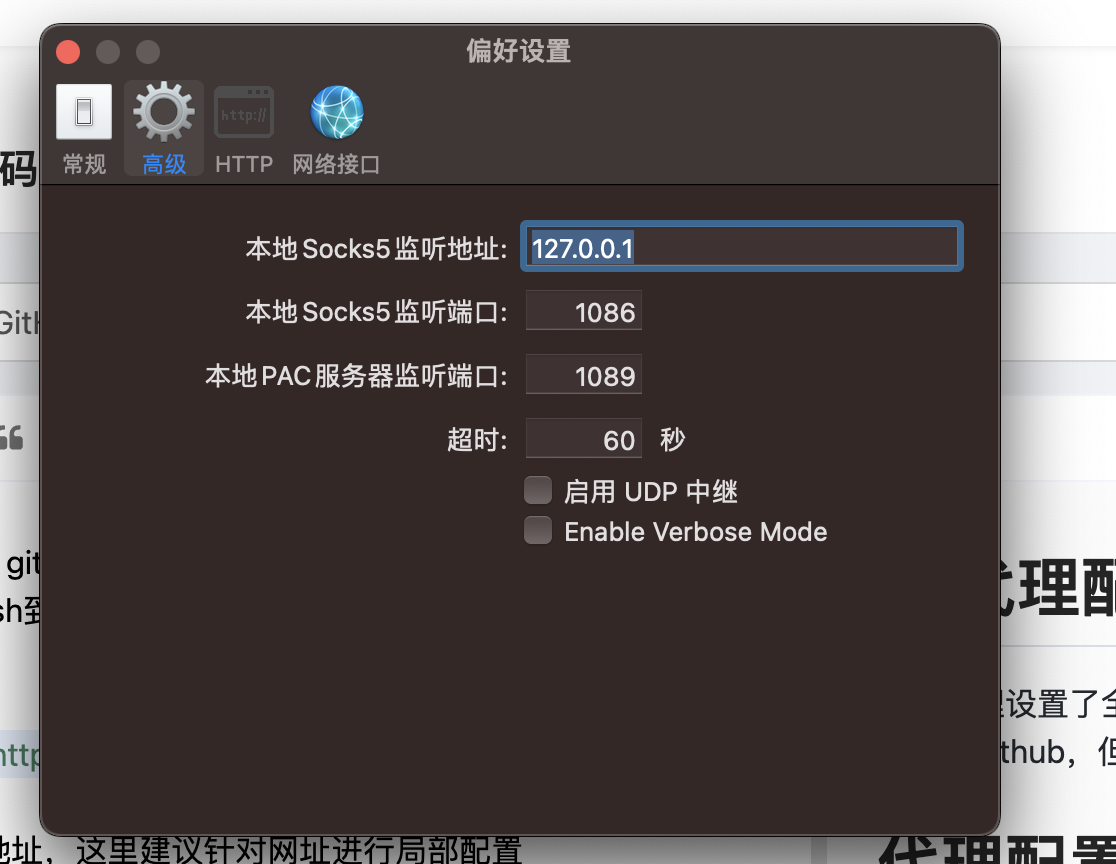
然后进行局部配置
git config --global http.https://github.com.proxy socks5://127.0.0.1:1086
git config --global https.https://github.com.proxy socks5://127.0.0.1:1086